PROFESSIONAL DATA RECOVERY

SSD and NVMe data recovery

SSD data recovery

We recover data from failed, locked and undetected SATA and NVMe SSDs, including laptop SSDs. Power the drive down, then get a free evaluation and a fixed quote before any paid work.
✓95% Success Rate
✓No Data, No Charge
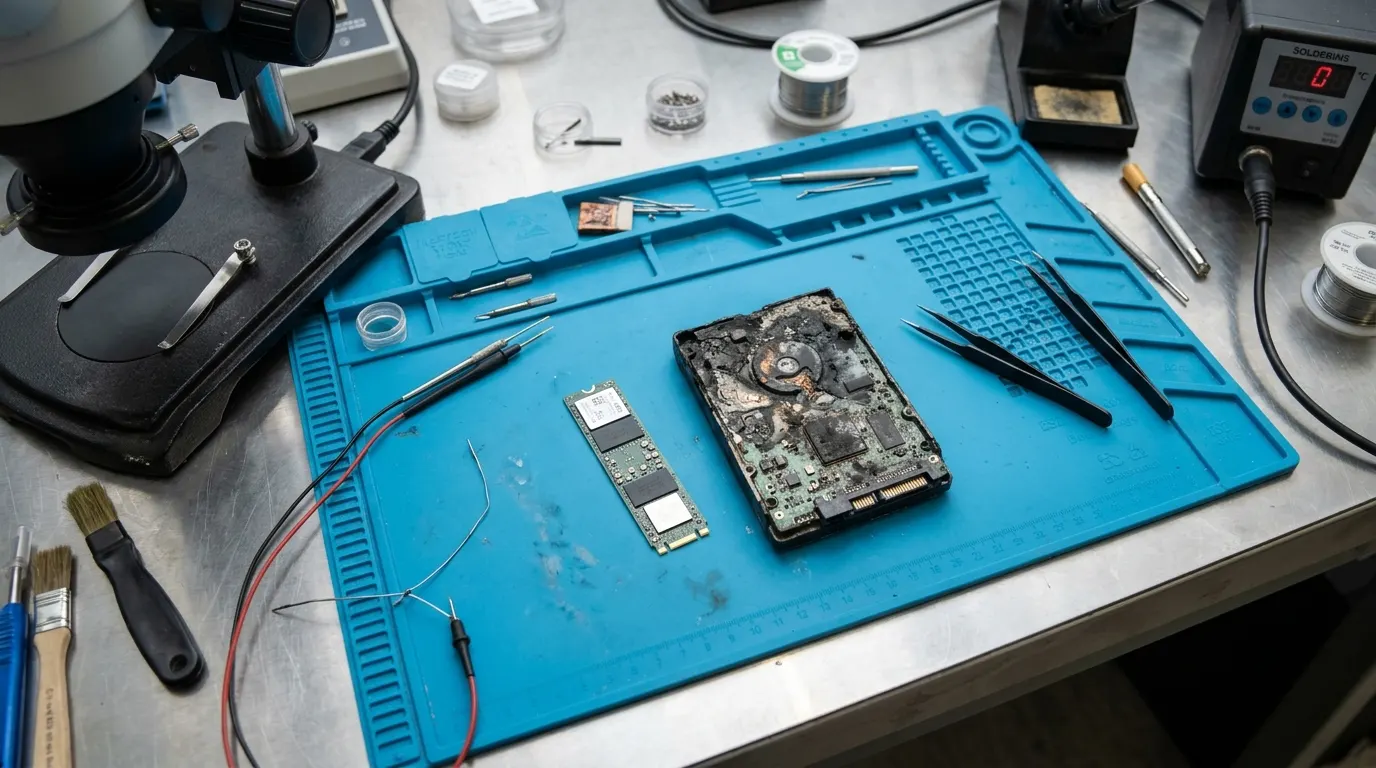
Fire-damaged hard drive and NVMe SSD on an anti-static mat

Why SSD recovery is different

SSD data recovery is not hard drive recovery with a faster disk. There are no heads or platters. Your files sit in NAND flash chips, and a controller decides where every block lives. The map that ties your files to physical locations is managed by the controller’s firmware. When the controller or firmware fails, the NAND can be intact and the drive still shows nothing.

Three things make SSD recovery and NVMe recovery harder than most people expect:

  • Controller and firmware failures. The most common SSD fault is not worn-out flash. It’s a controller that hangs, firmware that drops the drive into a safe mode, or a block map damaged by a sudden power loss. Desktop recovery software can’t fix any of that, because it needs the drive to answer first.
  • TRIM. When you delete files or format an SSD, the operating system tells the drive those blocks are free. The controller then erases them in the background. Once that happens, there is nothing left to read.
  • Encryption. Many SSDs encrypt everything they store with a key held by the controller, whether you turned encryption on or not. BitLocker, FileVault and similar tools add another layer on top. Recovery has to work through both.

Signs your SSD has failed

Most SSDs don’t give much warning. They work one day and act strangely the next. Common symptoms:

  • Not detected. The drive is missing from the BIOS, Disk Management or Disk Utility, or the computer boots to “no bootable device.”
  • Wrong capacity. The SSD shows up as a tiny size, 0 bytes, or under a generic name instead of its model number. That usually means the firmware has dropped into a safe mode.
  • Read-only. You can see files but can’t save anything, or every write fails. Some SSDs lock themselves read-only when they detect a fault.
  • Locked. The drive asks for a password you never set, or reports a security lock.
  • Slow or freezing. Copies stall, the system hangs when the drive is accessed, or files open as zeros or garbage.

What not to do with a failing SSD

An SSD that is powered on can still be changing. The controller runs garbage collection and TRIM in the background, and a failing controller can get worse each time it starts. The best move is usually to stop.

  • Don’t keep it powered. Shut the computer down or unplug the enclosure. Don’t leave it running overnight to see if it comes back.
  • Don’t keep power-cycling it. Each restart is another chance for a weak controller to fail completely.
  • Don’t format, initialize or repartition it. Windows and macOS will offer to when they see an unreadable drive. Click Cancel.
  • Don’t reinstall the operating system or restore a backup onto it. Both send TRIM commands across the drive.
  • Don’t run TRIM, “optimize” or retrim tools, and don’t run chkdsk or First Aid on it.
  • Don’t update the firmware. An update can overwrite the state we need to read the drive.
  • Don’t run recovery software on a drive that isn’t detected properly. It can’t help, and it keeps the drive powered.

Honest limits of SSD recovery

We would rather tell you this now than after the evaluation. Some SSD data can’t be recovered by anyone.

  • TRIMmed data is usually gone. If files were deleted or the drive was formatted while TRIM was active, the controller has likely erased those blocks. We check every case, and sometimes the erase hasn’t finished, but often there is nothing left to read.
  • Hardware-encrypted data may be unrecoverable. If the controller holds the encryption key and the controller can’t be brought back, the data on the NAND stays encrypted. Reading the chips directly then returns data nobody can use.
  • We can’t unlock encryption without your key. For BitLocker, FileVault or a drive password, we need your password or recovery key. We don’t break encryption, and we won’t pretend we can.
  • Physically destroyed flash is a hard limit. Cracked or burned NAND chips can take the data with them.

Our SSD data recovery process

Our SSD data recovery services follow the same order on every drive, whether it’s a SATA SSD, an M.2 NVMe drive or the SSD inside a laptop. All recovery work happens at our ISO 9001 certified lab in Columbia, MD, where we have been recovering data since 1991. The evaluation is free, you get a fixed quote before any paid work, and if we can’t recover the files you need, you don’t pay the recovery fee. No data, no charge.

  • Free evaluation. Tell us what happened and get the drive to us. We check the controller, the firmware state and the condition of the NAND.
  • Diagnosis and fixed quote. You get a plain explanation of the fault and a fixed quote before any paid work. You decide whether to go ahead.
  • Stabilize and image. We get the controller or firmware into a state where it answers, or read the NAND directly when the controller can’t be used. We make a full image of the drive and stop working on the original.
  • Recover from the image. File systems are rebuilt and files are extracted from that copy, not from your SSD.
  • Verified delivery. We check that the files you care about open, then deliver them on new media.

Logical jobs usually take 24–48 hours. Physical jobs usually take 3–7 days. If it can’t wait, call our 24/7 emergency line at (410) 937-7332. Form enquiries get a reply within one business day. Walk in at the Columbia lab, or ship the drive to us free both ways. Pickup is also available (call or use the form for details).

What affects the cost →

Recent recoveries, in our clients’ words

Corrupted SSD during a graduate thesis

The computer force-reset in the middle of a graduate thesis and the SSD was corrupted.

“Disk Doctors were able to recover all my files.”

How we handle common failures

Example scenario based on the kinds of failures we see. Not an individual client result.

NVMe SSD shows “0 MB”

A workstation crashes mid-render and its NVMe SSD disappears from the BIOS. In another machine or a USB enclosure it shows as “0 MB, uninitialised”.

How we handle it: This is usually the SSD’s controller or its firmware translation tables, not the memory chips. We connect the drive to dedicated SSD recovery hardware in a mode that stops background TRIM and garbage collection, stabilise the firmware, rebuild the translation layer, and read the data out.

Lesson: Don’t keep plugging in or rebooting a failing SSD. Background routines can permanently erase recoverable data.

SSD & NVMe recovery →

Frequently asked questions

Can you recover data from an SSD that isn’t detected?

Often, yes. An SSD that is missing from the BIOS usually has a controller or firmware fault, and the data can still be on the NAND chips. Power it down and send it in for a free evaluation.

Does TRIM mean my deleted files are gone?

Often, yes. With TRIM active, an SSD erases deleted or formatted blocks in the background, and erased flash can’t be read back. Stop using the drive now, and the free evaluation will show what is left.

Can you recover an encrypted or BitLocker SSD?

Yes, if the drive can be read and you have the password or recovery key. We can’t unlock encryption without your key. If the SSD’s built-in hardware encryption key was lost with a dead controller, the data may be unrecoverable.

How much does SSD data recovery cost?

Evaluation is free, and you get a fixed quote before any paid work. The price depends on the fault and what it takes to fix it. No data, no charge.

How long does SSD recovery take?

Logical jobs usually take 24–48 hours, and physical jobs usually take 3–7 days. For an emergency, call our 24/7 line at (410) 937-7332.

Where the work is done

All recovery work happens at our Columbia, MD lab (walk-in Mon–Fri, 8:30 a.m.–5:00 p.m.). Our Tysons, VA office sees clients by appointment. Ship your drive to us free both ways. Pickup is also available, call for details. 24/7 emergency line: (410) 937-7332.

Related: Hard drive recovery · RAID recovery · Laptop & desktop recovery · What affects the cost

Get a free evaluation

Tell us what failed. We reply within one business day, and you get a fixed quote before any paid work. No data, no charge.

Call (410) 937-7332Free Evaluation